The Workflow is dead. Long live the Workflow.
But now with intelligence in every step, and never fully in charge.
By Rob Boerman | Published on 2026-10-11
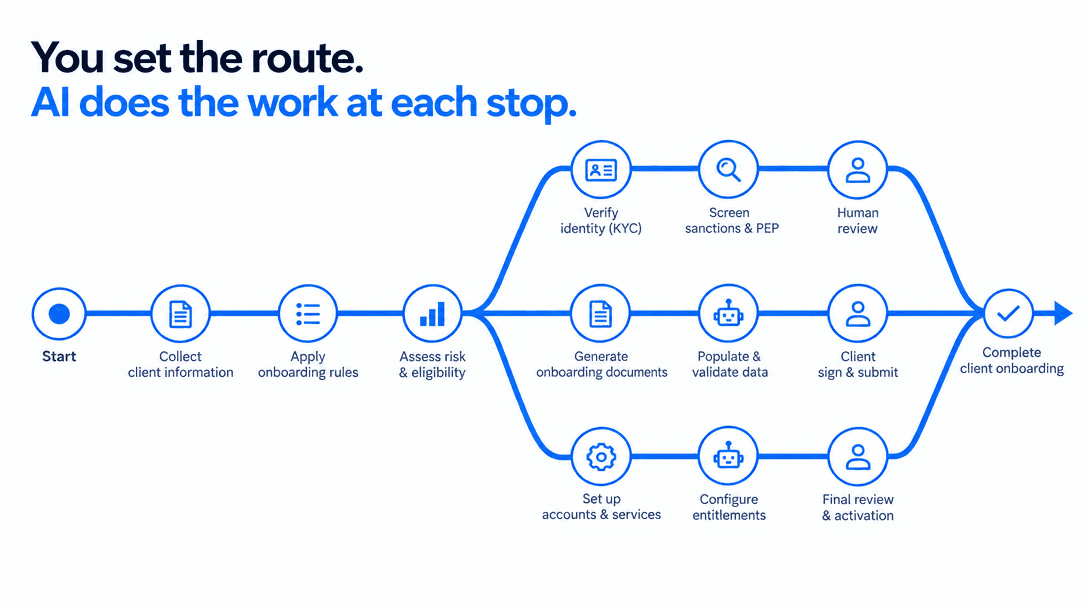
Keep control of the process. Let AI do the work inside it.
When AI agents came along, it looked like we wouldn't need workflows anymore. You give an agent a goal and some tools, and it works out the steps itself. I've built agents and agent teams like that, and the concept sounds appealing.
Then you try it on a real business process, like client onboarding. There are dozens of steps, multiple systems, strict rules and people who have to sign off. That's where it gets difficult, and where I see the workflow coming back. But a more intelligent workflow where AI does the work in almost every step, and where the process decides what happens next. In this post I'll show what that looks like for the example of a client onboarding.
Where Process Automation Usually Fails
When companies try to bring AI into a complex business process, I see two patterns again and again.
Mistake 1: The Agent That Does It All
The first is the agent that does it all. Give it a goal, a set of tools and a good prompt, and let it figure out the rest. It makes a fantastic demo. It is also very hard to explain to the people who are accountable for the process, because the agent chooses its own path, and that path may be different tomorrow. When something goes wrong, “the agent decided to” is not an answer you want to give to a customer, a manager or an auditor.
Mistake 2: The Workflow With AI Bolted On
The second is the rigid workflow with AI bolted on. Every step is scripted, and somewhere in the middle there is a call to a language model that fills in a text field. It is easy to approve, but it breaks on the first input that doesn't fit the script, and it leaves most of the value of AI on the table.
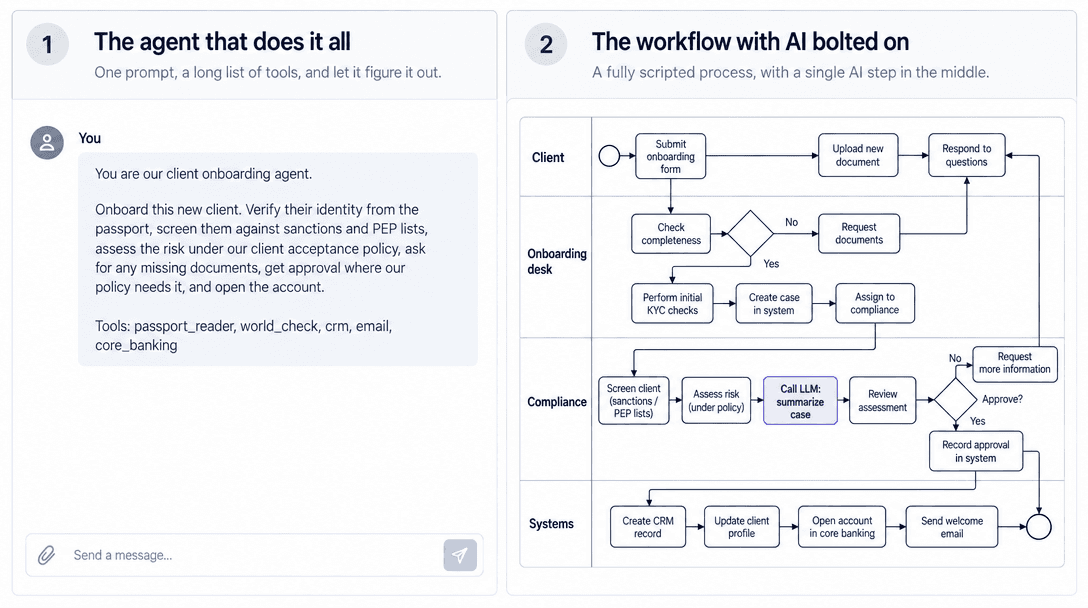
What most companies need sits somewhere in between. This is not the end of the workflow. It is a new kind of workflow, with AI in every step but never in charge.
A better approach: Own the Route, but Delegate the Work
The way out is to separate two things that the agent-that-does-it-all approach mixes up: the process itself, and the work inside it. The process (which steps exist, in which order, under which conditions, and who signs off) is something you design, version and own, just like the procedure your team works from today. The work inside each step is where AI belongs.
Those steps can be as intelligent as they need to be: a model can read a passport, an agent can research adverse media, a person can approve an exception. Some steps are plain rules, because a rule is all they need. Each step gets just enough intelligence for its job, and no more. But no step decides on its own where the process goes next. It produces an answer, and the route decides what that answer means.
In CORE we call this a Flow. A builder draws it once, tests it, publishes a version, and CORE runs it the same way every time.
“AI belongs inside the process,
not in charge of it.”
Using System 1 for Decision Points
Every process has decision points: which way does this case go next? In a classic workflow those are hard-coded rules, and for facts and thresholds they are still the right tool. For example: if deposit_amount > 100,000 → second_approval. A system can check that without any room for doubt. But many of the rules in a real procedure are written in plain language. “Apply enhanced due diligence when there is material adverse media.” or “Send the contract to legal when it deviates from our standard terms.” Rules like these are hard to turn into code, and too important to leave to a free-form answer from a language model.
That is exactly the kind of decision System 1 is built for. You define a fixed set of possible outcomes (a choice between named options, a score across distinct buckets, or a yes or no) and describe the criteria in plain language. The model picks one of those outcomes and gives a probability for every option.
When one option clearly wins and its probability is above the threshold, the answer itself becomes the route: a clear “low risk” goes one way, a clear “high risk” goes another. When no option clearly wins, the step says so, and that becomes a route too, usually towards a person. Because the outcomes are a fixed set that you wrote down yourself, the process stays predictable, even though the judgment inside it is made by AI.
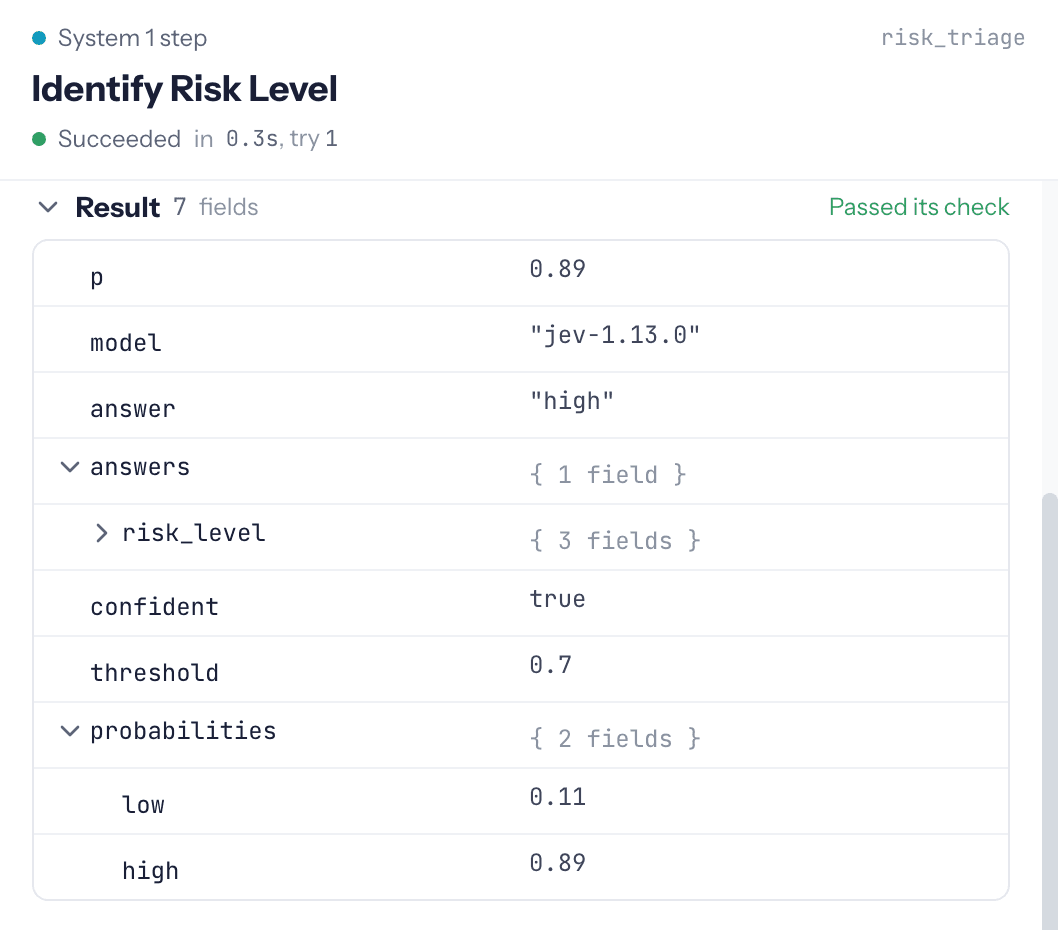
Enough Theory, Let's See It in Action
Client onboarding is a good example of the kind of process we build this way. A new client enters their details and uploads a passport copy. Screening, reading the passport, checking the policy and looking up earlier relationships happen in parallel. Rules check the hard facts. A System 1 step then judges the combined evidence against the policy and picks a risk class. From there, a low-risk client goes straight through, a medium-risk case gets a memo from an agent and a review by an analyst, a high-risk case is flagged to the compliance team in Slack and needs approval, and anything unclear lands with a person.
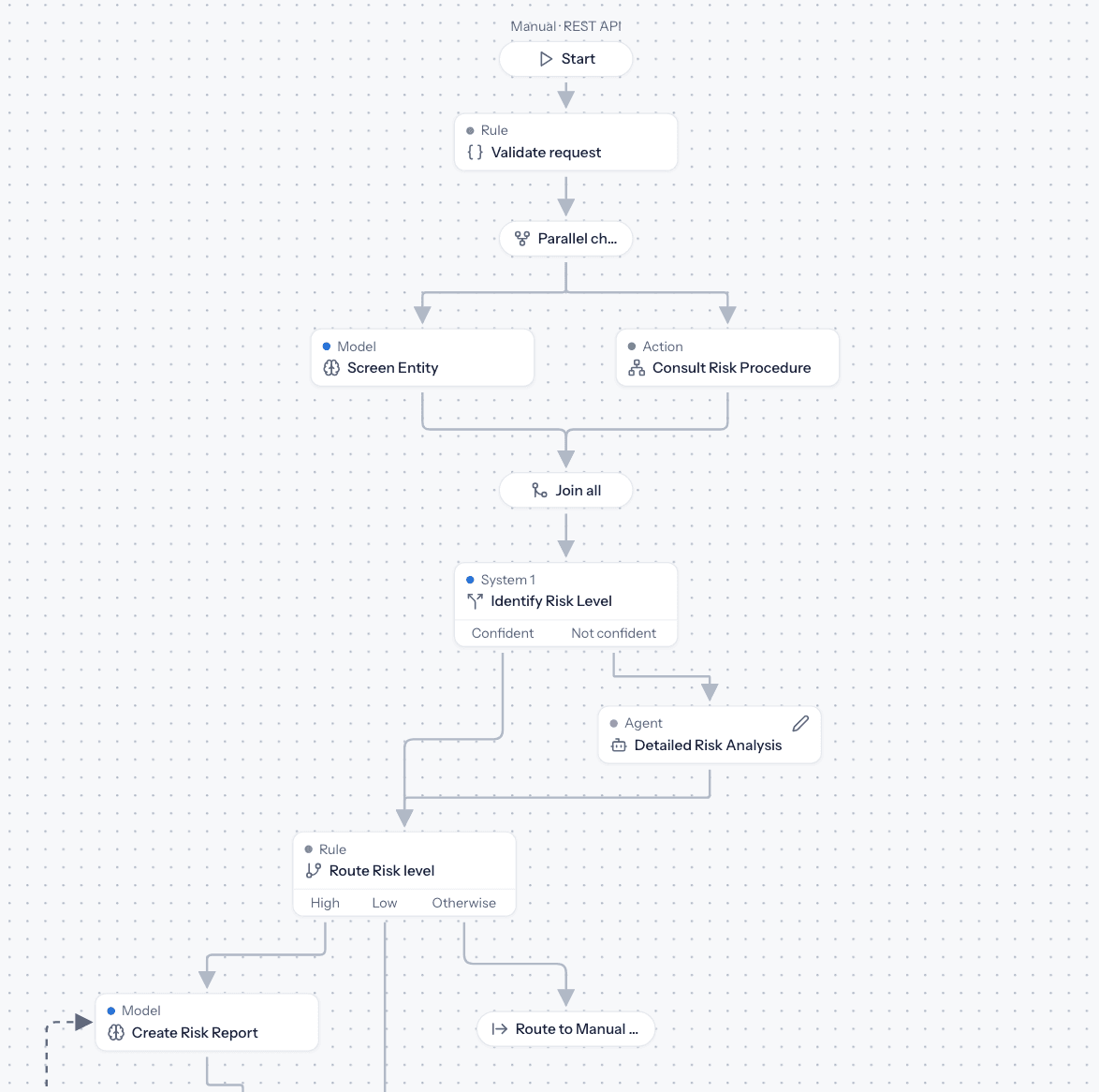
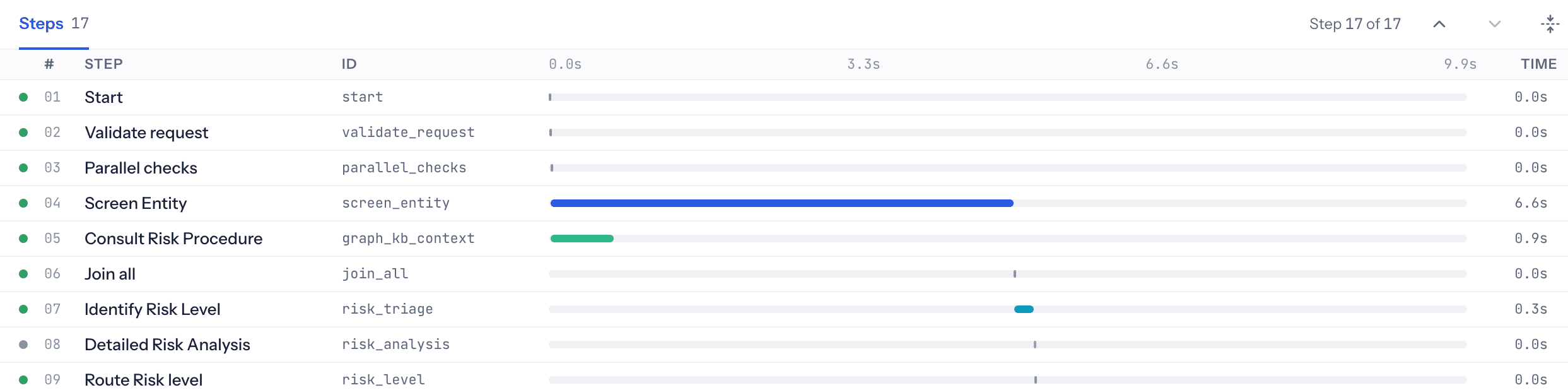
Building a process like this in CORE takes no more than a day, versus weeks or months you normally spend. But what matters most is that you can see exactly what it does. For every run you can follow each step: what data went in, what came out, how sure System 1 was, which route the case took, who approved it, and how long each step took. When something breaks, you see where and why, fix that one step, and run it again from there. That is the difference between an AI experiment and a process you can put your name under.
Build It Once, Use It Anywhere
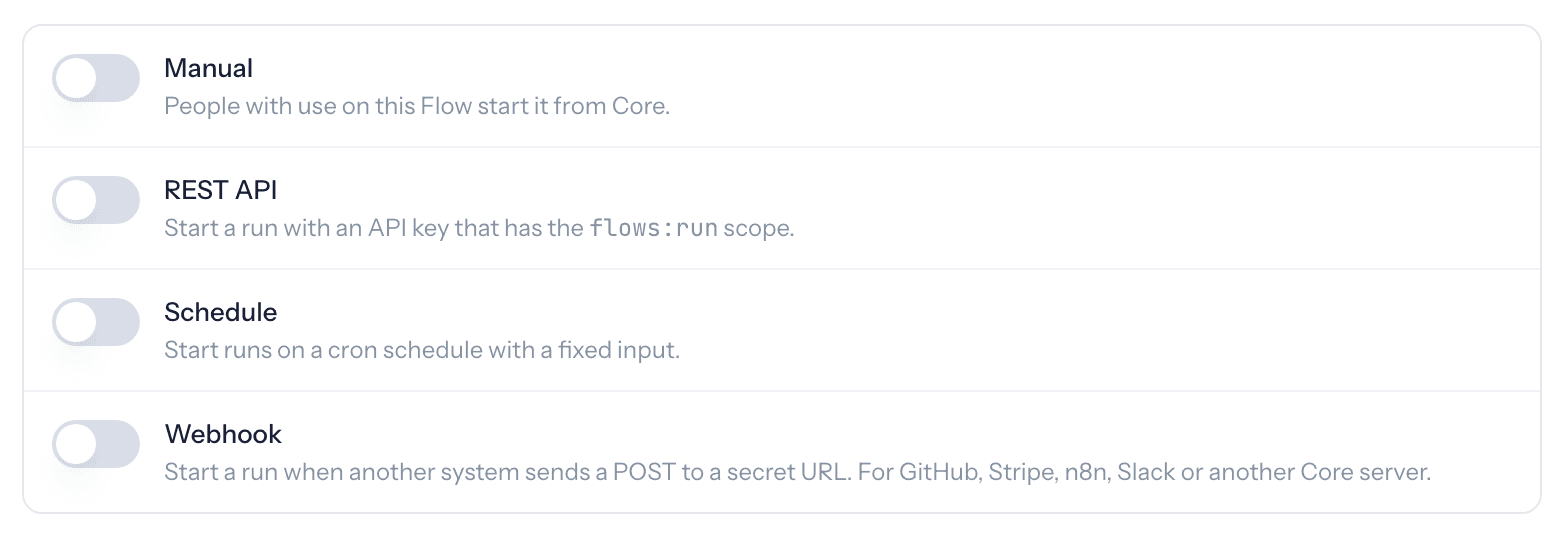
Once a Flow is published, it stops being something you click through. It becomes a capability you can use from anywhere, as often as you like: by hand, with tasks for the people involved; from your own applications through an API; from Claude or any other AI assistant as a tool; or on a schedule. Same process, same version, same trail, every time.
So, Is the Workflow Dead?
In our opinion: Yes, the traditional workflow is dead. We mean the one where every step is scripted, and every input that doesn't fit the script means a new rule or a broken case. But like a phoenix from the ashes, it comes back in a new form. You still draw the route, and you still own it. What changes is how it adapts to unpredictability and what happens inside each step: a plain, humanly written rule where a rule is enough, a model or an agent where the work needs more reasoning or judgment. You can improve or replace one step without touching the rest, and every run leaves a trail you can show to a customer, a manager or an auditor.
The workflow is dead. Long live the workflow!